Tray Menu
This page explains each feature of the MonitorDog Agent tray menu.
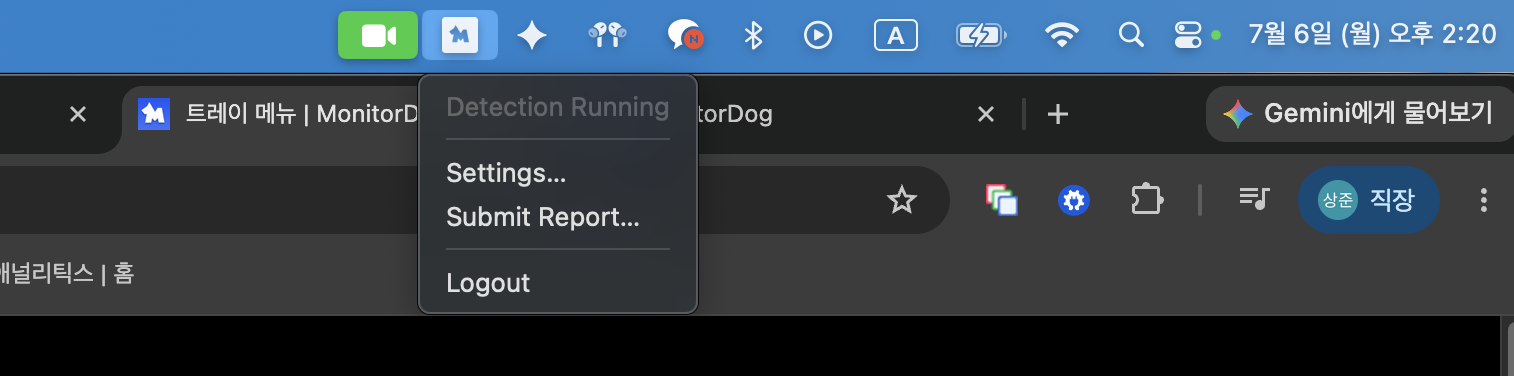
Click the MonitorDog icon in the top menu bar to open the tray menu. The tray menu lets you quickly control the MonitorDog Agent. You can use simple action buttons and check the monitoring status.
Menu Items
- Detection Running: MonitorDog monitoring is active. Suspicious activity and events are detected and sent to the administrator.
- Settings: You can check your information in the MonitorDog Agent. It is available in the Mac application window that opens afterward.
- Submit Report: If a problem occurs while using the program, send a report containing internal program logs to the MonitorDog team for troubleshooting.
- Logout: You can log out of the MonitorDog Agent. When you log out, monitoring stops and a logout log is sent to the administrator.
Q. I do not see the icon.
A. The tray icon appears only while the MonitorDog Agent is running. Run the agent to see the icon.