DLP Solutions Compared: Traditional DLP vs AI-Based Screen Security

Data Loss Prevention has been a cornerstone of enterprise security for decades. Yet reports of data leaks at organizations with DLP in place continue to surface. This article takes a technical look at what traditional DLP actually protects against — and where its blind spots begin.
TL;DR
- Traditional DLP blocks network transfers and endpoint file copying, but physical screen photography falls outside its detection scope.
- AI-based screen security uses webcams to monitor the environment around a screen and detect smartphone photographing attempts in real time.
- These two approaches are not competing solutions — they protect against different threat vectors and work best together.
What Traditional DLP Actually Blocks
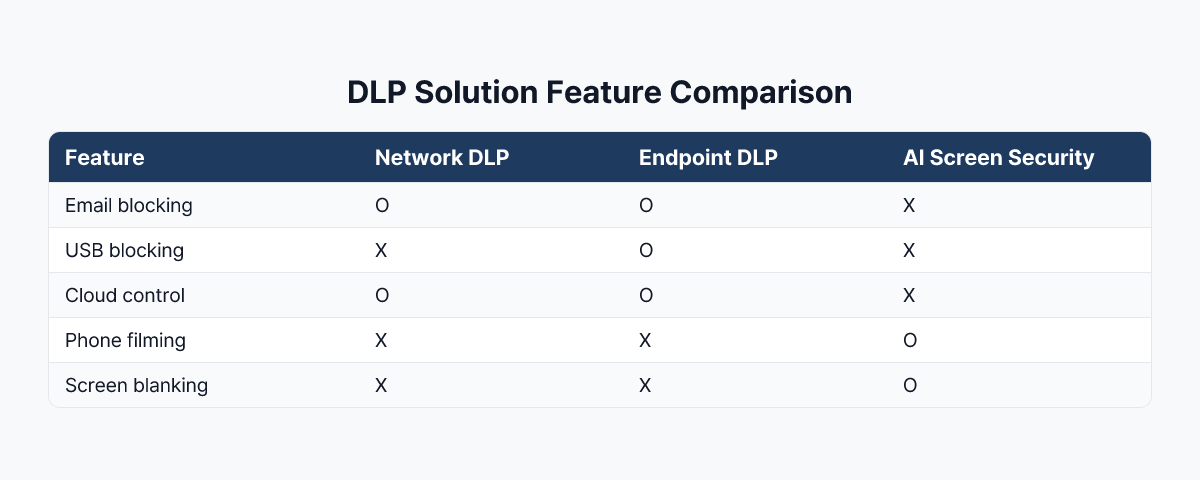
DLP solutions generally fall into two categories: network DLP and endpoint DLP.
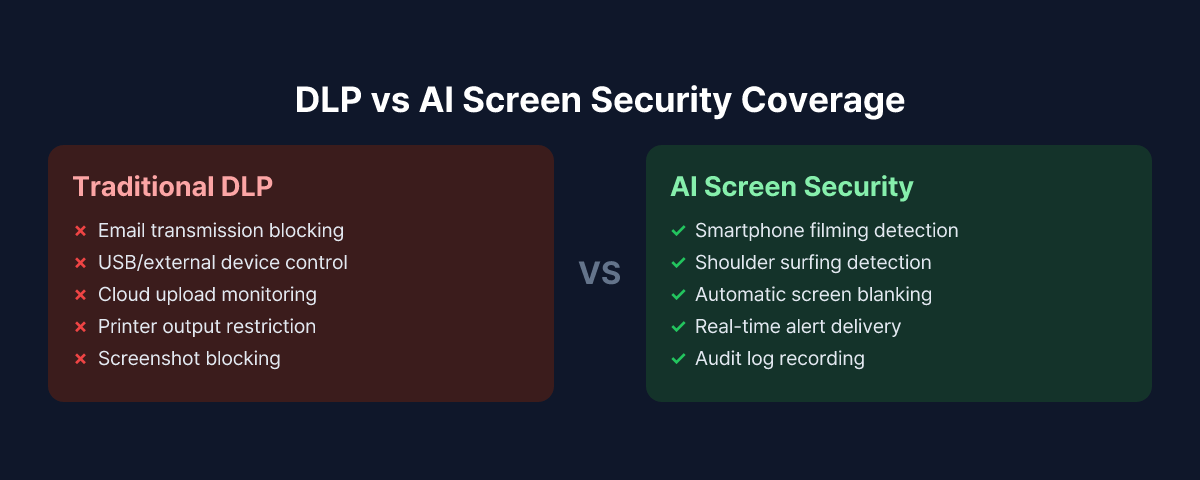
Network DLP inspects outbound traffic leaving the organization's network. It targets email attachments, uploads to cloud storage, and data submitted through web forms. When content inspection policies detect patterns like credit card numbers, government ID formats, or specific file types, the transfer is blocked or flagged.
Endpoint DLP deploys an agent on individual workstations to control local behavior. It governs copying files to USB drives, printing, taking screenshots, and clipboard activity. Unlike network DLP, it functions even when the device is offline.
Both categories share a fundamental assumption: that data moves through a digital pathway.
The Structural Limits of Traditional DLP
There is a class of threats that network and endpoint DLP are not designed to handle. The clearest example is physical screen photography.
Consider this scenario: an employee opens a file containing sensitive customer data on their work monitor, then photographs the screen with a personal smartphone. No data crosses the corporate network. No file system access is logged on the company device. No USB is connected. No clipboard is involved. From the perspective of traditional DLP, nothing unusual has happened.
But the data has already left the building.
Undetectable Pathways in Practice
When you categorize real-world security incident patterns, several routes consistently fall outside DLP's detection range.
Smartphone photography: Pointing a camera at a screen generates no network traffic. The corporate endpoint agent has no visibility into a personal device.
Video call screen exposure: A sensitive document that briefly appears on a shared screen during a meeting, or a security document visible in the camera background — neither event leaves a trace in DLP logs.
Shoulder surfing: A third party reading a screen in person is a physical act, outside the reach of any digital security tool.
These attack types are collectively known as visual hacking. Because they leave no digital trace, forensic investigation after the fact is difficult — and organizations often have no way to determine that a leak occurred at all.
What AI-Based Screen Security Does Differently
AI-based screen security takes a fundamentally different approach. Rather than monitoring where data travels, it monitors what is happening around the screen itself.
In practice, the solution analyzes the area around the workstation in real time using the employee's PC webcam. When the AI detects a camera or smartphone being directed at the screen, it can immediately blank the display and send an alert to the security team. The model is trained to recognize smartphone devices, classify photographing postures, and distinguish them from normal working behavior.
Where traditional DLP asks "what is moving, and where is it going," AI screen security asks "what is happening in front of this screen."
What AI Screen Security Covers
- Real-time detection of attempts to photograph the screen with a smartphone
- Immediate screen blanking when a threat is detected, minimizing what can be captured
- Event recording with webcam snapshots delivered to administrators
- Audit trail of suspicious behavior for compliance and investigation support
That said, AI screen security does not replace endpoint controls. File transfer restrictions, email attachment blocking, USB copy prevention — those remain in traditional DLP's domain.
How to Combine the Two Approaches
Traditional DLP and AI screen security are not competing products. They address different threat vectors. The practical strategy is to operate both in their respective roles.
Where traditional DLP excels: Large-scale data movement over digital channels, policy-based file transfer blocking, cloud upload controls, and insider threat detection based on digital behavior patterns.
Where AI screen security adds coverage: Physical camera photographing attempts, unauthorized visual access to screens in proximity, and visual information leakage in remote or hybrid work environments.
In practice, organizations in financial services and the public sector often keep their existing DLP infrastructure and add AI screen security as an additional layer. Because this approach targets only the blind spot rather than replacing the existing stack, it tends to deliver a favorable return relative to the implementation effort.
Which Organizations Should Prioritize AI Screen Security
Not every organization needs to deploy AI screen security immediately. If one or more of the following conditions apply, a closer evaluation is worth conducting.
High volumes of personal or financial data on screen: Call centers, bank teller operations, and healthcare intake processes regularly display sensitive customer information. The risk of an employee photographing that information — or exposing it to an unauthorized observer — is continuous.
High proportion of remote or hybrid workers: Without physical controls in the environment, compensating technical measures for screen security become more important.
DLP in place but no policy for visual hacking: If your security posture treats DLP deployment as a complete solution, it may be worth revisiting which threat pathways remain unaddressed.
Conclusion
DLP remains a critical component of enterprise security infrastructure, and it is effective at defending against information leaks over digital channels. But in an era where every employee carries a smartphone camera, physical screen photography is a threat vector that traditional DLP was not designed to detect.
AI-based screen security is the technology that fills this gap. When the two are operated as complementary layers, organizations can build a defense posture that addresses both digital and physical threat vectors — not just one.
To see how MonitorDog operates alongside existing DLP environments, try a free demo and walk through real detection scenarios firsthand.
References
- Gartner, "Market Guide for Data Loss Prevention" (2024)
- Ponemon Institute & DTEX Systems, "2025 Cost of Insider Risks Global Report" (2025)
- 3M & Visual Privacy Advisory Council, "Global Visual Hacking Experiment" (2016)
Related Contents
Browse All Contents
Browse