Screen Security Strategies for Call Centers and Financial Institutions

A call center agent pulls up a customer's account number, national ID, and loan history — all on screen — while taking an inbound call. A smartphone sits on the desk beside the monitor. At that moment, no DLP alert fires. Call centers and financial institutions handle the most concentrated volumes of customer personal data, yet they often carry the most structurally vulnerable screen security posture.
TL;DR
- Call centers and financial institutions process high volumes of sensitive customer data in real time, making a single screen exposure an immediate data leak risk.
- Traditional DLP controls digital transmission channels — but photographing a screen with a smartphone bypasses every detection layer.
- Combining internal controls with AI-powered screen detection is what makes the difference between policy on paper and protection in practice.
Why Financial Institutions and Call Centers Face Higher Screen Security Stakes
Financial institutions and call centers operate under security conditions that differ fundamentally from general office environments. A single agent may access dozens to hundreds of customer records in a day — account numbers, credit scores, transaction histories — data that carries direct financial value.
According to the Personal Information Protection Commission of Korea, 307 personal data breach reports were filed in 2024, with internal factors such as employee negligence or deliberate action accounting for 30% of all incidents. One in three reported breaches did not require an external attacker.
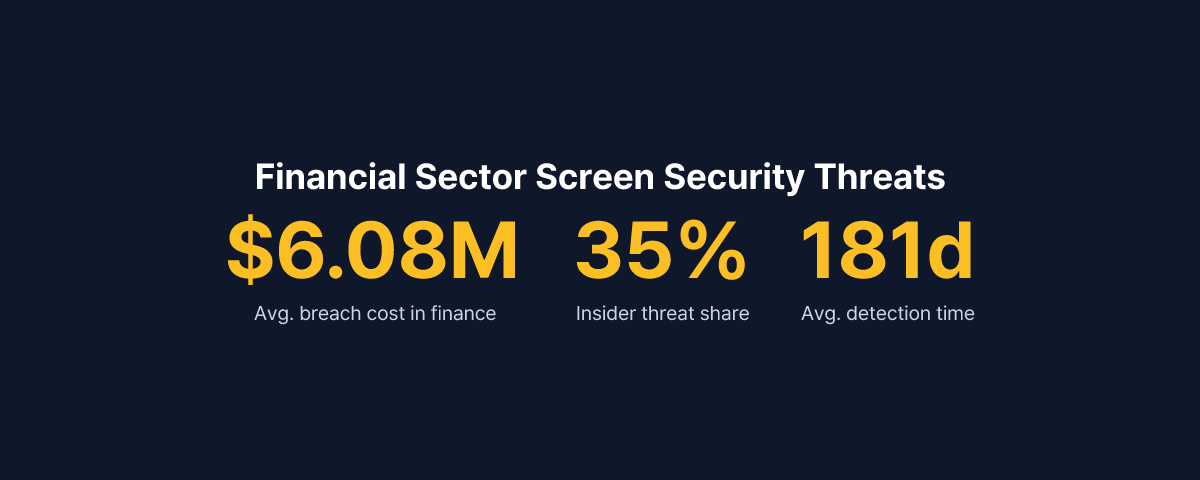
Globally, the average cost of a data breach in the financial sector reached $6.08 million per incident in 2024 — 22% above the cross-industry average (IBM Security, Cost of a Data Breach Report 2024). That figure includes regulatory fines, customer attrition, and legal liability. The financial weight of a single breach in this sector is categorically different from most other industries.
Why Screen Photography Sits Outside Existing Security Controls
Many financial institutions and call centers already enforce screenshot blocking, USB port lockdowns, personal email restrictions, and file encryption. All of these measures share a common assumption: the threat travels through a digital channel.
Photographing a monitor with a smartphone uses no digital channel. It generates no file transfer, no network packet, and no log entry that an endpoint agent can detect. When an agent photographs a screen displaying customer data, there is nothing in the DLP logs, nothing in the network logs, and nothing anywhere to indicate it happened.
The structural environment of call centers amplifies this risk. Dense seating arrangements mean neighboring screens are naturally visible. Smartphone prohibition policies exist on paper, but enforcing them comprehensively is a practical challenge at scale. High turnover and shift-based staffing make consistent per-employee security monitoring difficult to maintain.
The fact that insider threats account for 35% of data breaches in financial services, with an average detection lag of 181 days (Verizon DBIR 2025), illustrates how long and quietly a screen security gap can persist before it surfaces.
What Financial Regulations Actually Require
South Korea's Electronic Financial Supervision Regulation and the Personal Information Protection Act require financial institutions to implement technical and administrative safeguards — including access controls, leak prevention measures, and processing records — for customer data.
The scope of "technical safeguards" matters significantly here. When a breach occurs, regulators assess whether the institution had reasonable protective systems in place. An institution with no technical measure to detect or prevent screen photography will find it difficult to argue that adequate controls were implemented.
The Personal Information Protection Act also mandates breach notification within 72 hours of discovery, with penalties of up to 30 million KRW for non-compliance. The problem with screen-based leaks is that they leave no trace in DLP or network logs — making it structurally difficult to even know a breach occurred, let alone report it within 72 hours.
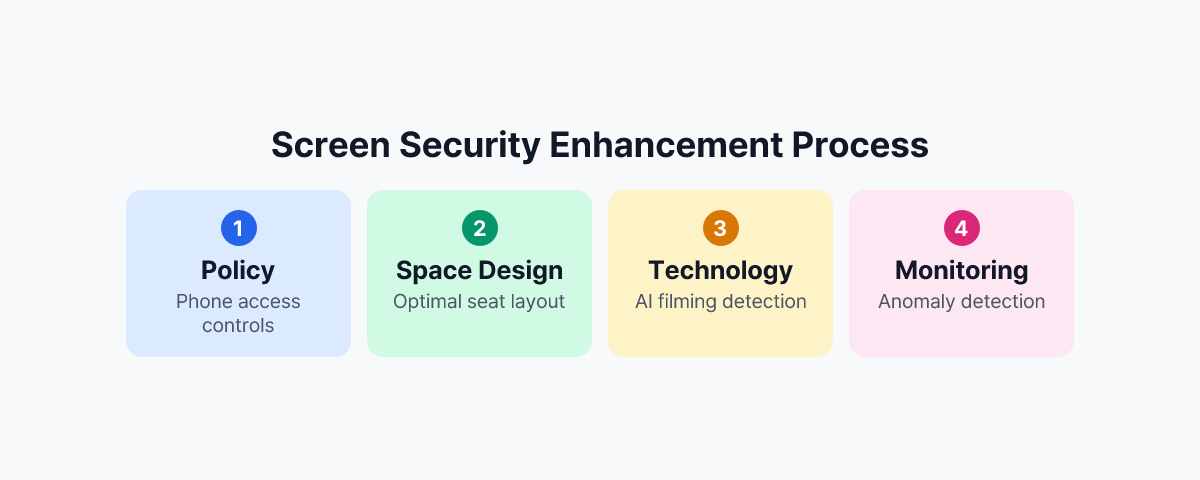
Practical Screen Security Strategies
Policy: Managing Device Access and Workspace Layout
The most fundamental measure is a enforceable smartphone restriction policy — not merely a stated prohibition, but one built around smartphone storage lockers at entry and exit points, monitoring within the work area, and clearly defined consequences for violations.
Seating arrangements for teams handling sensitive data should be designed to minimize screen exposure. Monitors should not face corridors or public walkways, and areas where customer data is processed should be physically separated from visitor routes.
Technology: AI-Powered Screen Detection
Policy has limits. No manager can monitor hundreds of agents simultaneously in real time. Technology must cover what human oversight cannot.
MonitorDog uses employees' PC webcams to detect smartphone photographing attempts through AI in real time. When a photographing attempt is detected, the screen blanks immediately, and administrators receive an alert along with a timestamped event record. In an environment where dozens of agents work simultaneously, this automated detection layer is the only way to make real-time response viable.
This approach technically covers the physical photography blind spot that DLP cannot reach. It also functions as a behavioral deterrent — when staff know that photographing attempts are detected immediately, the likelihood of attempts decreases.
Monitoring: Behavioral Anomalies and Post-Incident Traceability
Screen security is not only about prevention. Organizations also need the ability to record anomalous behavior and reconstruct events after the fact. Patterns such as an agent accessing an unusually high number of customer accounts before the end of a shift, or rapidly querying multiple records in succession, should be detectable.
MonitorDog's security insights dashboard tracks per-user behavioral history, identifies high-risk activity patterns, and surfaces these to administrators. These records are also usable for post-incident forensics — as evidence for regulatory submissions or legal response when a breach is being investigated.
What Deployment Looks Like in Practice
For financial sector customers who have deployed MonitorDog, actual smartphone photographing attempt events were detected within the first few weeks after rollout. Risks that had previously been dismissed as unlikely turned out to be present — and happening.
The purpose of these detections is not punitive. They serve as evidence that the organization's internal control framework is functioning as designed. When regulators conduct security audits or assessments, the ability to present both technical screen security measures and a log of detected events changes how an institution is evaluated.
In call centers and financial institutions, screen security is not a discretionary enhancement. Every moment that customer data is on screen is a potential exposure point. Without a technical system monitoring those moments, internal controls exist only in documentation.
To see how MonitorDog works in call center and financial institution environments, request a demo to experience the detection process firsthand.
References
- Personal Information Protection Commission of Korea, "2024 Personal Data Breach Report Analysis" (2025)
- IBM Security, "Cost of a Data Breach Report 2024" (2024)
- Verizon, "2025 Data Breach Investigations Report" (2025)
- Financial Supervisory Service, "Electronic Financial Supervision Regulation" (current)