Web SDK Integration Overview
This section explains how to integrate the MonitorDog Web SDK.
When you integrate the MonitorDog Web SDK, your website can help prevent data leaks by blocking screen recording attempts.
Because the MonitorDog Web SDK runs in the browser, some features may not be supported compared with the MonitorDog PC Agent.
Basic Overview
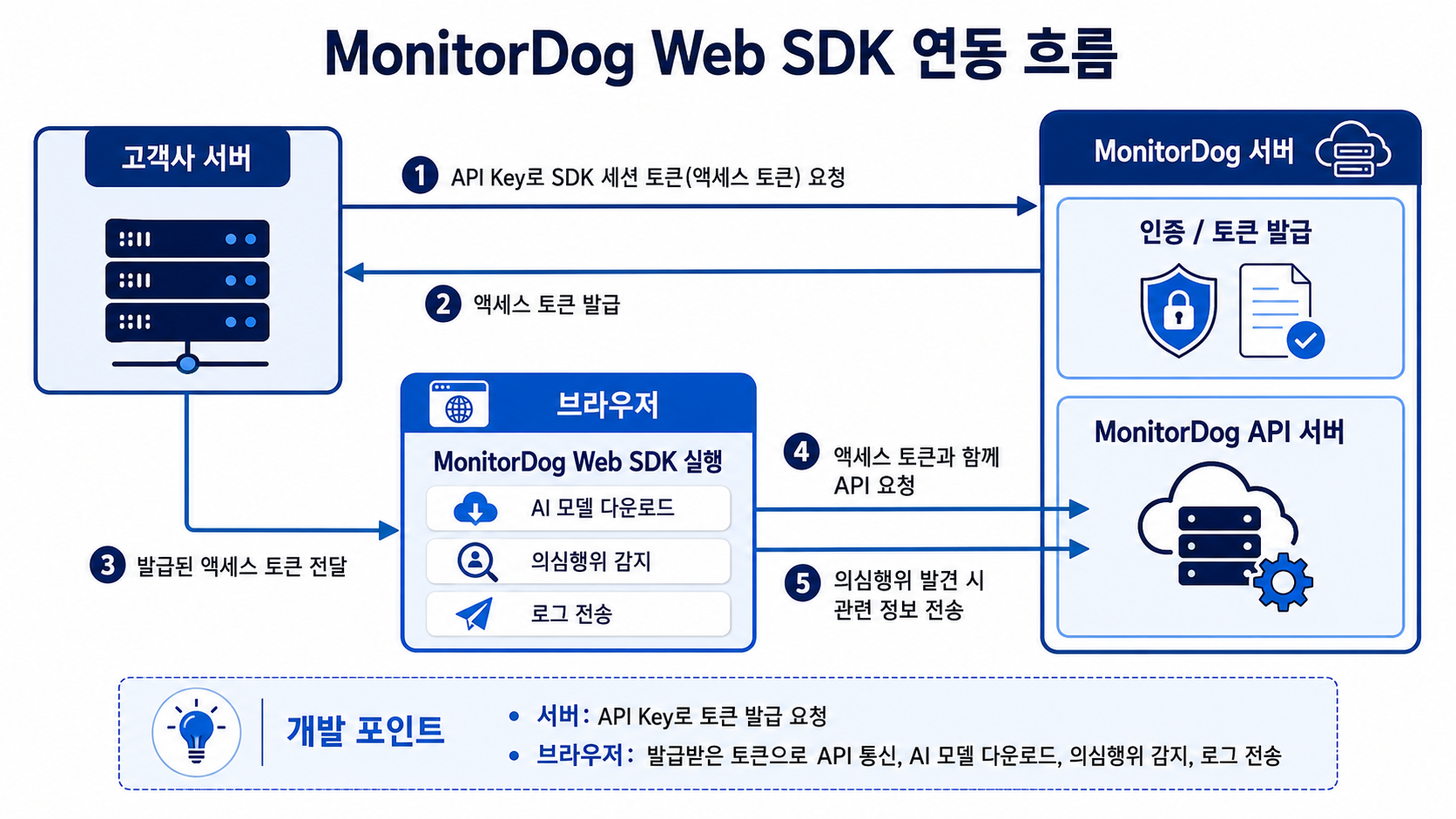
MonitorDog Web SDK integration prepares both the browser SDK settings and your server access token endpoint.
- Browser: register
sessionTokenProviderinMonitorDogDetector.init(). - Login:
detector.login({ email })callssessionTokenProvider({ email }). - Customer server: the access token endpoint calls MonitorDog
POST /v1/sdk/sessionsand returns only the SDK access token to the browser. - Runtime: the browser SDK uses the issued access token for model download, suspicious activity detection, log transmission, and related runtime work.
Prerequisites
- MonitorDog Web SDK npm package
@monitordog/detector - MonitorDog Web API key
⚠️ Never include the Web API key in the browser bundle, localStorage, HTML, or public runtime config.